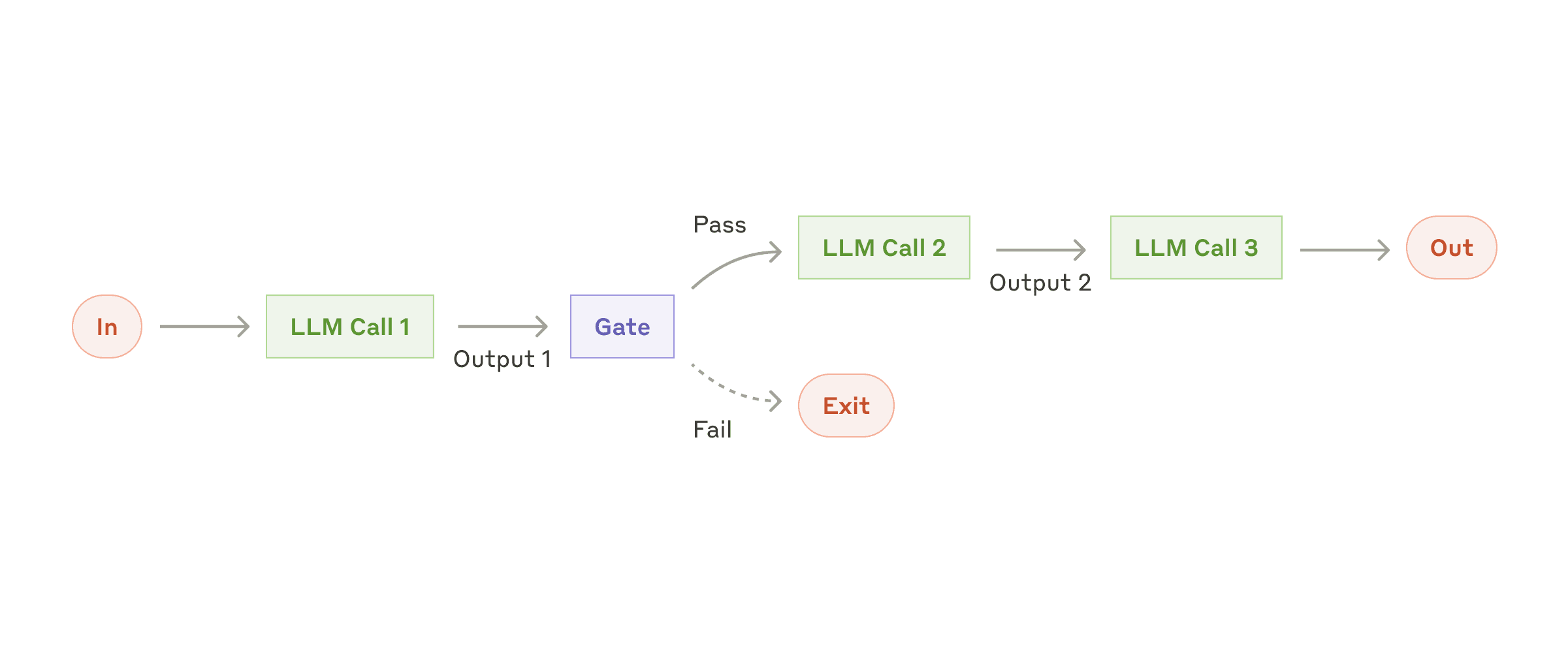
// Step 1
    """
    Extract only the numerical values and their associated metrics from the text.
    Format each as'value: metric' on a new line.
    Example format:
    92: customer satisfaction
    45%: revenue growth""",
// Step 2
    """
    Convert all numerical values to percentages where possible.
    If not a percentage or points, convert to decimal (e.g., 92 points -> 92%).
    Keep one number per line.
    Example format:
    92%: customer satisfaction
    45%: revenue growth""",
// Step 3
    """
    Sort all lines in descending order by numerical value.
    Keep the format 'value: metric' on each line.
    Example:
    92%: customer satisfaction
    87%: employee satisfaction""",
// Step 4
    """
    Format the sorted data as a markdown table with columns:
    | Metric | Value |
    |:--|--:|
    | Customer Satisfaction | 92% | """
使用场景
此工作流非常适合于任务可以轻松明晰地分解成多个固定子步骤的场景. 用延迟换取更高的准确性
原文:
When to use this workflow: This workflow is ideal for situations where the task can be easily and cleanly decomposed into fixed subtasks. The main goal is to trade off latency for higher accuracy, by making each LLM call an easier task.